Clothing Photo Editing Service – Boost Sales 2026
Why Clothing Photo Editing Service Matters for Ecommerce Sales
In today’s competitive online shopping environment, high-quality product photos are essential to capture your audience’s attention and drive sales. Professional clothing photo editing service ensures your images look polished, consistent, and appealing. Studies show that 93% of buyers consider visual appearance the most important factor in purchasing decisions.
Investing in proper photo editing can significantly increase conversions and build trust with your customers. For more insights on ecommerce photography, check out Shopify’s guide to product photography.
Step 1: Choose the Best Software for Clothing Photo Editing
Selecting the right software is crucial for efficient editing:
- Adobe Photoshop – Advanced features for professional editors
- Lightroom – Ideal for batch color and lighting adjustments
- Canva – User-friendly for beginners and quick edits
Choose the tool that fits your skill level and the type of product images you handle.
Step 2: Upload High-Quality Product Photos
High-resolution images are the foundation of great editing:
- Use clear, sharp images to avoid pixelation
- Capture products from multiple angles to highlight details
Uploading quality images ensures your editing process yields the best results. Learn more about ecommerce product image best practices.
Step 3: Crop Images to Highlight Your Clothing
Proper cropping focuses attention on your product:
- Remove distractions – eliminate background clutter
- Focus on details – showcase unique features of your clothing
A clean crop draws the customer’s eye directly to the product, increasing engagement. For advanced cropping techniques, check Adobe Photoshop tutorials.
Step 4: Adjust Lighting, Color & White Balance
Enhance the visual appeal of your clothing:
- Brightness & contrast – make colors pop and items more vibrant
- White balance – ensure true-to-life colors
Accurate color representation builds trust and reduces returns.
For tips on color correction, see Professional Color Correction Guide.
Step 5: Retouching for Professional Results
Retouching removes imperfections and enhances quality:
- Remove wrinkles – especially freshly delivered clothing
- Fix minor flaws – dust spots, stray threads, or color inconsistencies
Professional human photo retouching service ensures every image looks flawless and credible.
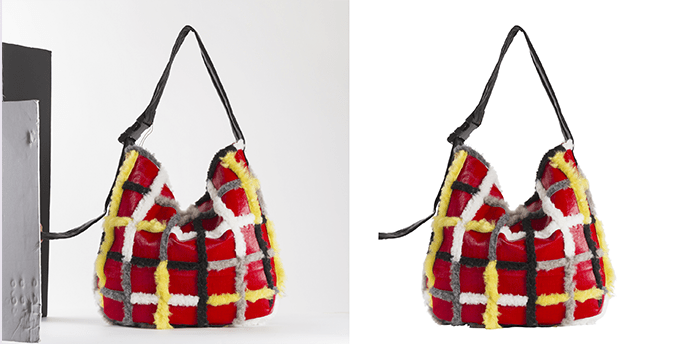
Step 6: Enhance with Backgrounds & Shadows
Subtle background and shadow work makes products stand out:
- Simple backgrounds – white or neutral tones work best
- Add shadows – creates depth and a realistic 3D effect
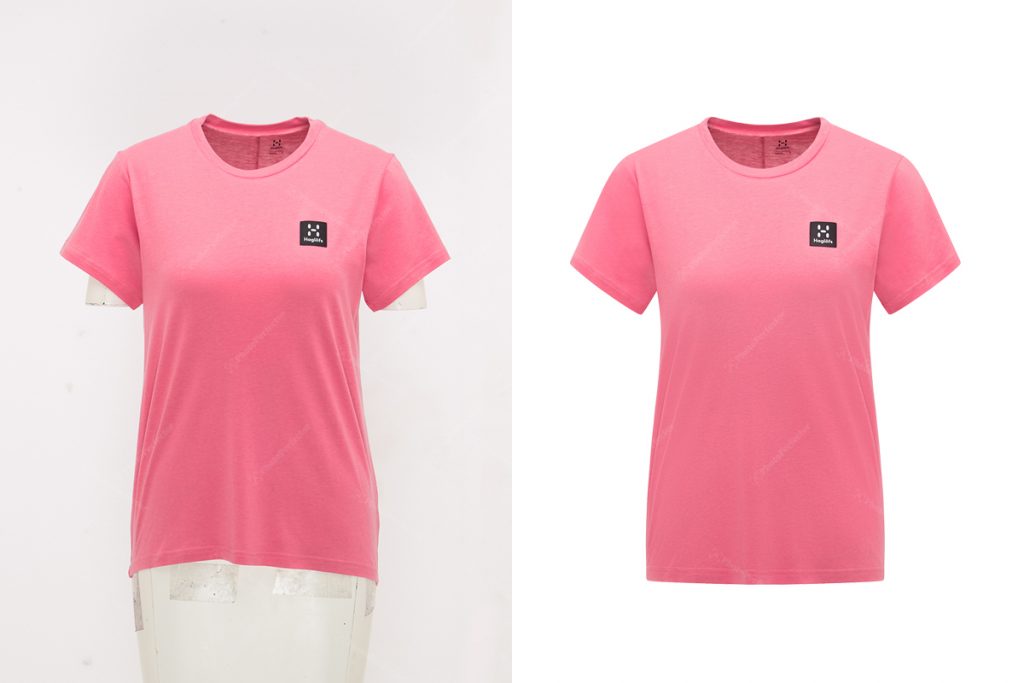
Consistent backgrounds and shadows make your clothing look professional and ready for ecommerce. Learn more about ghost mannequin editing techniques.
Step 7: Save Images in the Right Format for Ecommerce
Choose the correct file type to balance quality and load time:
- JPEG – Best for website and online stores
- PNG – Use for transparent backgrounds or overlays
Optimized file formats improve website speed and overall user experience. For web performance, check Google PageSpeed Insights.
Try Our Free Clothing Photo Editing Service
At Photo Perfector, we offer five free photo edits so you can experience the difference professional editing makes. See firsthand how polished, human-edited images can improve your online sales.
- professional photo retouching service → https://photoperfector.com/on-model-apparel-photography-retouching-service/
- Apparel photo retouching service → https://photoperfector.com/apparel-photo-retouching-service/
Conclusion: Boost Sales with Professional Clothing Photo Editing
Editing your clothing product photos doesn’t have to be complicated. By following these steps and using a professional clothing photo editing service, you can improve visual appeal, build customer trust, and boost sales in 2026.
Start today and watch your ecommerce business thrive! For more tips on improving product photos, read Shopify’s Ultimate Product Photography Guide.